
Knowledge Center › Product features
Product features
LED Handle
The RGB LED handle lights on the ApexZ particle counter light up during and after sampling to indicate warning and alarm status. Flashing LED lights indicate that the ApexZ is currently taking a sample. If the LED light is a solid color, the instrument has stopped sampling. The color of the LED light after a sample is completed also shows the last recorded warning or alarm status.
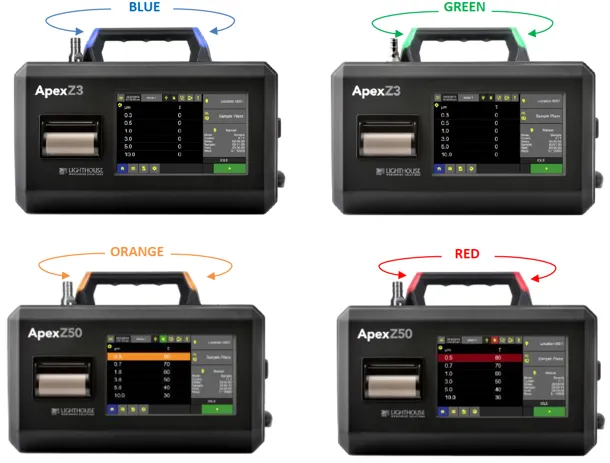
Flashing LED colors indicate that the ApexZ particle counter is actively sampling. (Blue also means that alarms have been disabled)
- Flashing Blue Sampling active No instrument error
(warnings/alarms disabled)
- Flashing Green Sampling active No instrument fault, no warning, no alarm.
- Flashing Orange Sampling active No instrument fault, warning limit exceeded.
- Flashing Red Sampling active Alarm limit exceeded
and/or faults detected.
Solid LED colors indicate that the ApexZ is not currently sampling.
Solid Green Sampling complete Warning/alarm limits not exceeded,
no fault detected.
Solid Orange Sampling complete Warning limit exceeded,
no instrument error detected.
Solid Red Sampling complete Alarm limit exceeded and/or
instrument errors detected.
ApexZ™ Particle Counter — more information
Our team is here for your questions. Send us your quote or demo request.
Get a Quote